A tmux-like terminal multiplexer / Rust

wtmux
Split the terminals.
Connect the work.

Bring the familiar tmux workflow of windows and panes to Windows, macOS, and Linux. Keep shells, development servers, logs, and coding agents together, and control the whole workspace from the keyboard.

  • v3.3.1
  • Windows
  • macOS
  • Linux
  • MIT
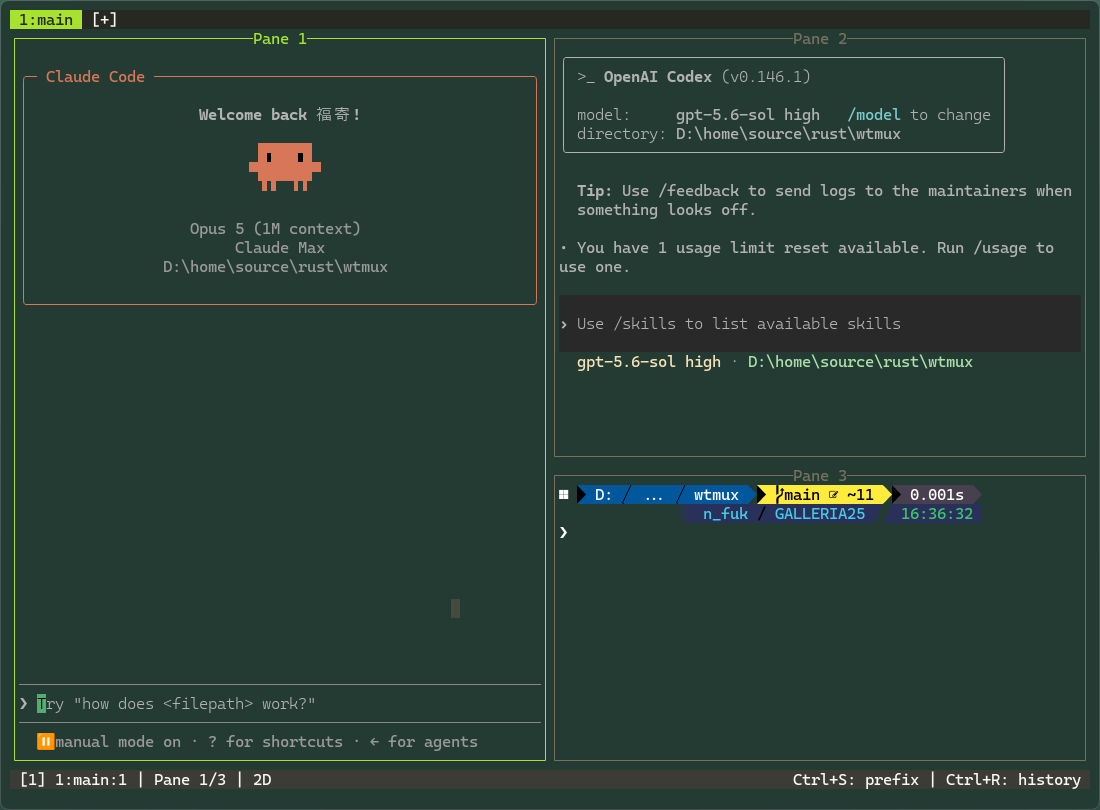
Claude Code, OpenAI Codex, and PowerShell arranged in three wtmux panes
1:main / 3 panesagents + shell

01 / Why wtmux

Keep your tmux habits
on your everyday OS.

Terminal work quickly turns into a field of windows: a shell, editor, log, build, and SSH connection all compete for attention. wtmux is a terminal multiplexer that organizes those jobs into windows and split panes, so finding the right task does not interrupt the task itself.

Like tmux, the default interaction starts with Ctrl+B followed by a command key. Existing muscle memory can create windows, split horizontally or vertically, move focus, resize, and zoom. Every binding can be changed, and root bindings can run without a prefix.

wtmux began as a Rust application built around Windows ConPTY. It now runs on macOS and Linux through POSIX PTYs as well, preserving one interaction model and configuration while using the terminal foundation native to each system.
02 / Core features

Build several workspaces
inside one terminal.

01

Windows and split panes

Separate projects into windows, then split each one horizontally or vertically. Move focus by direction, drag or key-resize a border, zoom one pane, and cycle through even-horizontal, even-vertical, main-horizontal, main-vertical, and tiled layouts.

02

Copy, search, and history

Navigate scrollback in a vim-like copy mode, select text, and copy it to the host clipboard. Search forward or backward through long output, and use wtmux's command history—separate from the shell—to find and reuse complex commands.

03

Shells and encodings

Choose cmd.exe, Windows PowerShell, PowerShell 7, or WSL on Windows, and use bash, zsh, fish, or another shell on macOS and Linux. UTF-8 is supported everywhere, with Shift-JIS available for Windows workflows.

04

Themes and terminal fidelity

Eight themes include Solarized, Monokai, Nord, Dracula, Gruvbox, and Tokyo Night. Nerd Font and Powerline glyphs, OSC 8 links, extended underlines, OSC 52 clipboard, and the Kitty keyboard protocol preserve modern prompts and TUI applications.

03 / See the workspace

See the state.
Send input where it belongs.

Claude Code, OpenAI Codex, and PowerShell shown together in wtmux
A multi-pane workspaceMonitor agents and a shell in one window
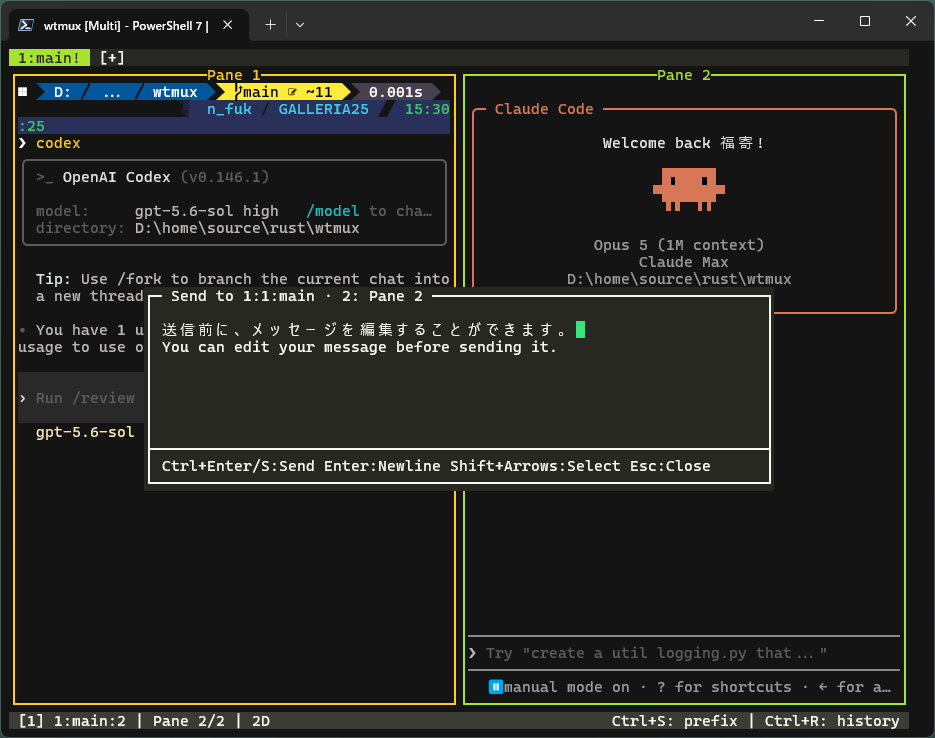
The multiline message composer in wtmux
Message composerEdit a multiline instruction before sending

04 / Agent workflow

Multiple coding agents,
one view.

When coding agents run in several panes, you need to know which one is working and which one needs input. wtmux classifies each pane as WORKING, BLOCKED, DONE, or IDLE, making the state visible in a dashboard and status indicators.

The message composer is an IME-friendly multiline editor for reviewing an instruction before sending it to a pane. The send-keys, capture-pane, and report-state commands extend the same workflow from direct keyboard use to scripted orchestration.

1Split

Give each role its own pane

2Monitor

See working and blocked states

3Compose

Edit multiline input before sending

4Automate

Drive input and output from the CLI

05 / Familiar keys

Start with the same
tmux prefix.

Ctrl+Bc

New window

Ctrl+B%

Split left/right

Ctrl+B"

Split top/bottom

Ctrl+Bz

Zoom pane

Ctrl+B[

Copy mode

Ctrl+B/

Search scrollback

Ctrl+BSpace

Next layout

Ctrl+Bm

Compose message

Every prefix command can be reassigned or removed in [bind] inside config.toml. Add shortcuts that work without a prefix through [bind_root].

06 / Native terminal backends

Three operating systems.
One interaction model.

On Windows, wtmux uses the operating system's ConPTY pseudo-terminal to run console applications and WSL in each pane. On macOS and Linux it runs inside your regular terminal with POSIX PTYs.

Configuration, windows and panes, copy and search, themes, and mouse interaction carry across platforms. Skills learned on Windows remain useful on macOS or Linux, preserving the rhythm of terminal work when the host changes.

WindowsConPTYcmd / PowerShell / pwsh / WSL
macOSPOSIX PTYzsh / bash / fish / custom shell
LinuxPOSIX PTYbash / zsh / fish / custom shell

One terminal. Many tasks.

Build a workbench
inside your terminal.

GitHub Releases provides packages for Windows and macOS. On Linux, build a package or compile directly from source.

Explore wtmux on GitHub ↗